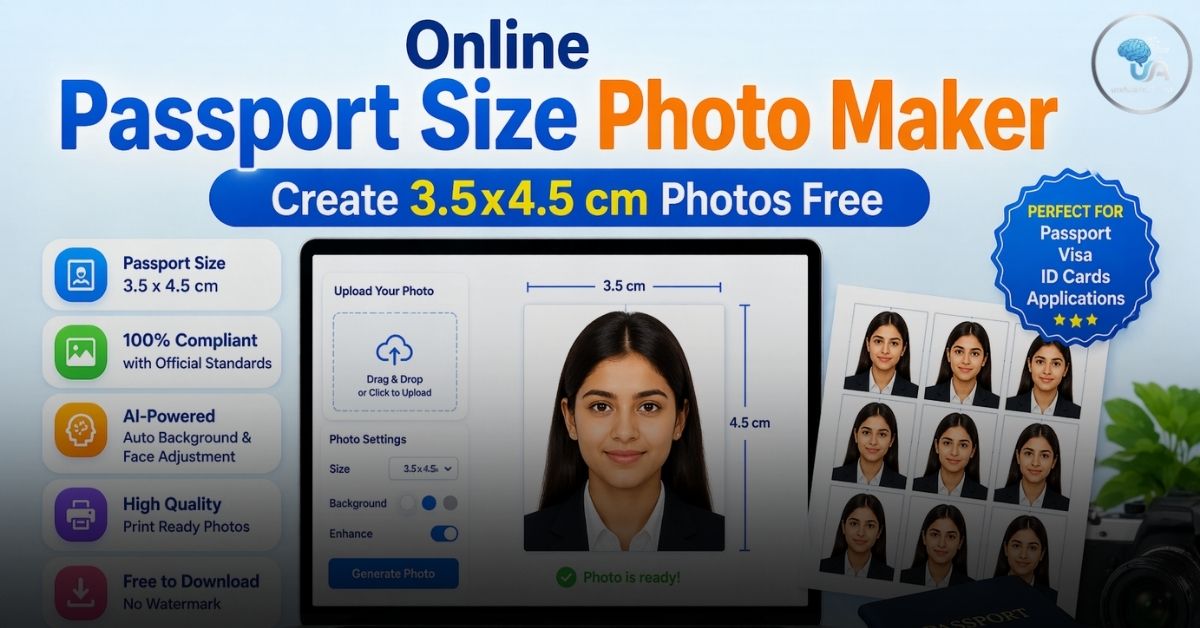
Passport Size Photo Maker Online: In an increasingly digital world, the need for official documentation hasn’t disappeared—it has simply migrated online. Whether you are applying for a new job, renewing your driver’s license, or filing a visa application, one requirement remains constant: the Passport Size Photo.
Historically, getting these photos meant a trip to a local studio, waiting in line, and paying a premium for a physical sheet of four or six pictures. Today, thanks to tools like the Passport Size Photo Maker on Useful AI Tool, you can create a high-quality, compliant photo from the comfort of your home using nothing more than your smartphone and a web browser.
In this extensive guide, we will explore the technical requirements of passport photos, provide a step-by-step tutorial on using our online tool, and share professional tips to ensure your application never gets rejected.
Why Use an Online Passport Photo Tool?
Convenience is the obvious answer, but the benefits go much deeper:
- Cost-Efficiency: Traditional studios charge for printing and labor. Online tools allow you to generate the digital file for free or at a fraction of the cost.
- Infinite Retakes: In a studio, you get maybe two or three tries before the photographer gets impatient. At home, you can take 50 photos until you find the one where you look your best.
- Specific Dimensions: Different countries and forms require different sizes (3.5×4.5 cm, 2×2 inches, etc.). An online tool allows you to crop precisely to these pixels.
- Instant Results: No waiting for “3-5 business days” for processing.
For more helpful digital utilities that simplify your daily tasks, visit our main repository of resources at Useful AI Tool.
Technical Specifications: The 3.5cm x 4.5cm Standard
While requirements can vary slightly by country, the 3.5 cm x 4.5 cm (35mm x 45mm) format is the international standard for most passports, visas, and national ID cards.
Key Requirements to Remember:
- Aspect Ratio: 7:9 (Width to Height).
- Head Position: The head should occupy about 70-80% of the photo.
- Resolution: For digital uploads, a minimum of 600 DPI is usually recommended for clarity.
- Eye Level: Your eyes should be positioned between 2/3 and 3/4 of the way up from the bottom of the photo.
If you are looking to combine your creative hobbies with your professional needs, check out our Pokémon Infinite Fusion Calculator to see how we apply similar image-processing logic to gaming!
How to Use the Passport Photo Maker: A Step-by-Step Tutorial
Creating your photo with our tool is designed to be foolproof. Follow these steps for the perfect result:
Step 1: Capture Your Base Image
Don’t use a selfie. Ask a friend to take a photo of you or use a tripod. Stand against a plain, light-colored background (white or off-white is best). Ensure the lighting is even on both sides of your face to avoid harsh shadows.
Step 2: Upload to Useful AI Tool
Go to the Passport Photo Maker section. Click on the “Upload” area. You can select a file from your computer or mobile gallery. Our tool supports high-resolution JPG and PNG formats.
Step 3: Position and Scale
Once the image appears on the canvas, use the Zoom Slider to adjust the size of your face. You can click and drag the photo within the frame to align your eyes and chin according to the standard guidelines.
Step 4: Adjust Brightness
Sometimes indoor lighting can make photos look dull. Use the Brightness Slider to enhance the image, making the background look cleaner and your features more distinct.
Step 5: Download and Save
Click the “Download Photo” button. The tool will process your edits and save a 3.5×4.5 cm proportional image to your device, ready for upload to any government portal or for printing.
Professional Tips for a “Rejection-Proof” Photo
Even with the best tool, the quality of the input matters. Government agencies are strict. Follow these rules to ensure your photo is accepted:
1. The Background
While our tool allows you to brighten the photo, it cannot replace a messy background. Stand at least 3 feet away from a white wall to prevent your shadow from falling onto the background.
2. Neutral Expression
Most passport offices forbid “active” expressions. This means no big smiles, no frowning, and no squinting. Maintain a “neutral” face with both eyes open and looking directly at the camera.
3. Attire and Accessories
- Glasses: If you wear glasses daily, you can usually keep them on, provided there is no glare on the lenses and your eyes are fully visible. However, many agencies now prefer “no glasses” for biometric accuracy.
- Headwear: Only allowed for religious or medical reasons. Ensure the headgear does not cover any part of your face.
- Clothing: Wear normal street clothes. Avoid uniforms or anything that blends into the white background.
4. Lighting is Everything
The biggest reason for rejection is “unnatural skin tones” or “shadows on the face.” Use natural light from a window if possible. Avoid using the camera’s direct flash, as it often creates a “red-eye” effect or a bright spot on the forehead.
FAQs on Passport Size Photo Maker Online
Q1: Is this tool free to use?
Yes! The Passport Photo Maker on Useful AI Tool is completely free to use as many times as you need.
Q2: Can I use this for a US Visa?
The US Visa typically requires a 2×2 inch square photo. While our standard tool is set to 3.5×4.5 cm, you can use the zoom and drag features to frame your face appropriately, though you may need to adjust the final crop for the specific 1:1 square ratio required by US portals.
Q3: What is the best file format to download?
We provide the download in JPEG format, as it is the most widely accepted format for online government applications due to its balance of quality and small file size.
Q4: My photo looks a bit blurry, what should I do?
Blurriness usually happens if the original photo was taken in low light or with a shaky hand. Try taking a new photo in a brighter environment and re-uploading it.
Q5: Is my data safe?
Absolutely. Our tool processes the image locally in your browser or deletes it from the temporary server immediately after processing. We do not store your personal photos.
The Importance of Biometrics in Modern ID
In 2026, passport photos are more than just pictures—they are biometric data points. Facial recognition software at airports and borders uses the distance between your eyes, the width of your nose, and the shape of your jawline to verify your identity.
This is why using a tool that maintains the correct proportions is vital. If you manually resize a photo and accidentally “stretch” your face, the biometric software might fail to recognize you, leading to delays at immigration.
Conclusion
Preparing for an application shouldn’t be a source of stress. By using the Passport Size Photo Maker, you take control of your documentation. You save time, save money, and ensure that you look exactly how you want to in a document that will stay with you for the next ten years.
Explore more life-changing tools at Useful AI Tool. Whether you are looking for productivity boosters or just want to have fun with our Pokémon Infinite Fusion Calculator, we are here to provide the web’s most useful utilities.
For official international travel guidelines, you can always check the ICAO (International Civil Aviation Organization) standards or visit your local Government’s Official Passport Portal for specific country-wise updates.
Disclaimer: While this tool follows standard international guidelines, always check the specific requirements of the department you are applying to before submission.